
Counter Flame, styled CounterFlame on its website, is an installable mobile shooter. Its project page advertises Android and iPhone support and tactical 5v5 play. The project’s licence describes it as independent. Its comparisons with CS2 should not be treated as proof of a Valve-issued mobile release.
Download status checked October 16, 2026: the project’s primary Android APK link opened a Google Drive notice saying the item was unavailable because it violated Google’s terms. The project-listed Yandex Disk alternative displayed a file but also a download-limit message. The iPhone option linked to an IPA through Telegram and described a signing requirement. We did not download, install or scan either package, create an account, or test gameplay.
View CounterFlame project download options ↗
Use that project page to check the current routes. It is a download-options page, not an instant browser game or a verified successful installation.
Choose the Android or iPhone download route
The English download page has Android and iPhone tabs. Switching tabs changes the file route and installation notes. Wait for the file details to finish loading before relying on a version number or size.
| Platform | What the project listed | Result of this check |
|---|---|---|
| Android | APK through Google Drive, with Telegram and Yandex Disk alternatives | Drive displayed a terms-related access notice; the Yandex file page displayed a quota-related obstacle |
| iPhone | IPA through Telegram, requiring signing | The project tab and its instructions were read; no Telegram join, IPA retrieval or signing was performed |
These were the routes presented on the checked page. We did not establish a Google Play, App Store or TestFlight listing from that route. The older licence also mentions RuStore, but that statement does not verify a current store listing. Follow the live project links rather than substituting a similarly named app or an unrelated APK result.
Android requirements and the current APK access problem
The loaded download page listed Android 8.0+, version 1.3.0.1 and 1875 MB. These are project-published values, not measurements of a downloaded file or a tested minimum device. The homepage’s broader Update 1.3 label differs in precision from the download page’s build number; read the selected platform’s loaded metadata.
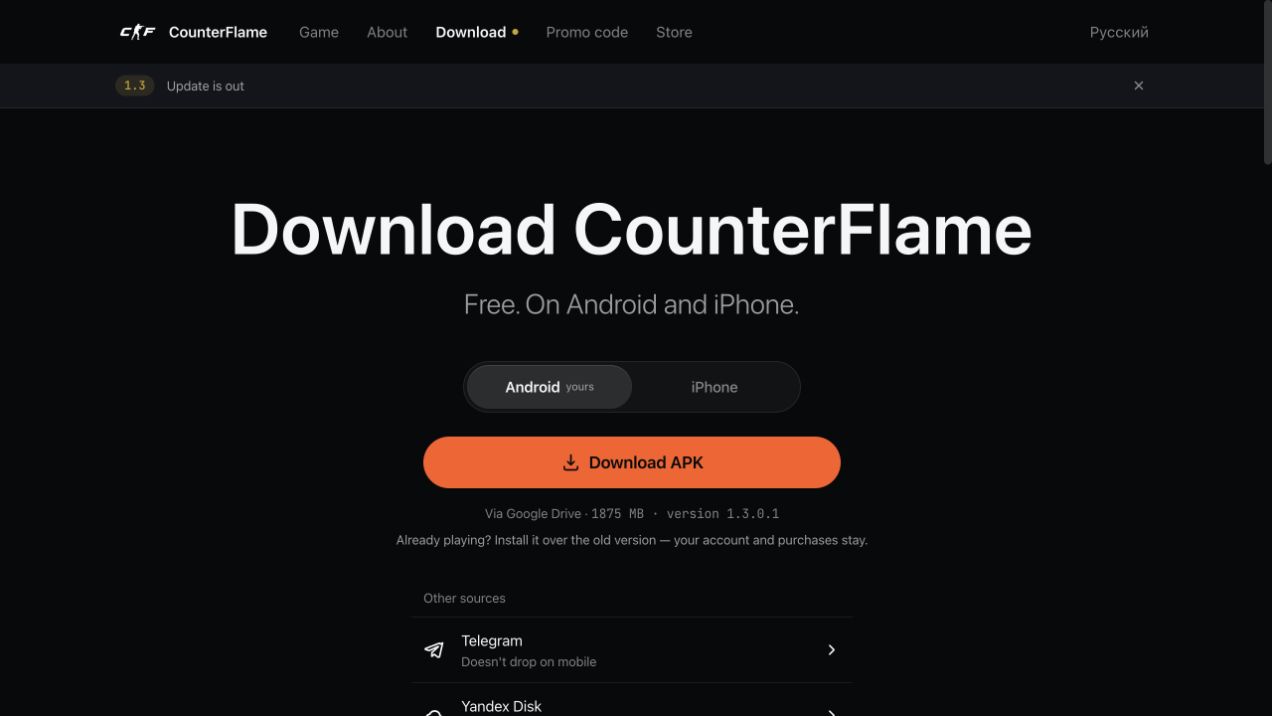
Project download page captured October 16, 2026. Its linked Google Drive file was inaccessible during this check. The screenshot records published options and metadata, not a completed download. Game presentation belongs to the project and its respective owners.
Why the Google Drive button did not download a file
Following the project’s APK link reached Google’s own message that the item could not be accessed because it violated its terms. The notice did not identify the reason. It does not, by itself, prove a particular copyright, malware or account issue, and this guide does not infer one.
Refreshing a fully loaded project page does not establish that Google has restored the linked file. Check the project for an updated route or use its listed support contact to report the exact message.
What the Yandex alternative showed
The project-listed Yandex page displayed CounterFlame-1.3.0.1-c5.apk. It also displayed a notice that the download limit had been exceeded, alongside a save-to-Yandex-Disk route. We did not sign in, save a copy or confirm a successful download. Seeing the filename is therefore evidence of a public file page, not proof that the binary is retrievable without an account.
The project also lists a Telegram alternative. We did not join its invite or retrieve a file. This page links to the project’s current options rather than maintaining separate copies or promising that a particular mirror works.
Android installation: what remains to be checked
The project’s instructions describe an APK installation outside Google Play. They say to download the package, use Android’s installer and open the installed app. That sequence is the project’s description; our check stopped at the file-access stage.
Before treating an installation problem as a game bug, separate these stages:
- File access: did the project-linked service actually deliver a complete APK? The checked Drive route did not.
- Device requirements: compare the intended phone with the project’s current Android requirement and available storage. Published download size is not a measured total installed size.
- Installation: read the device’s installer and security messages. A blocked download and an installer rejecting a package are different problems; do not assume changing phone settings fixes the first.
- Account and first launch: only after a successful installation can login, resource loading and gameplay be tested. None of those stages was reached here.
We did not verify an APK signature, checksum, installed size, frame rate, controller support or a successful update over an existing installation.
iPhone: IPA signing is a separate requirement
The iPhone tab listed iOS 13+, 1.3.0.1 and 1875 MB and linked Download IPA to Telegram. It described the file as unsigned and said it needs signing before installation. Downloading an IPA is only one stage; it is not the same as installing an App Store app.
The project names third-party signing tools and describes certificate and Apple ID steps. We did not assess those tools, enter an Apple ID, import a certificate, install a profile or establish developer trust. This guide does not recommend a signing provider or reproduce an unverified credential-entry procedure. Review the identity and requested access of any provider before using it; use the project’s support route if it cannot explain its distribution method.
The project’s claims about certificate duration, re-signing and retaining purchases were not tested. Likewise, its iOS minimum does not establish successful installation or performance on every iPhone running that version. No physical iPhone was used.
Accounts, free access and updates
The licence, updated May 17, 2025, says game access requires an account and describes username/password or Google registration. This is a published requirement, not a login flow observed in an installed build. The same licence labels the game 16+ and gives additional parental-consent conditions; read those current terms before registering.
The project advertises the game as free while separately displaying a marketplace and paid extras. We did not purchase anything or verify regional availability. Free download messaging should not be read as a claim that every item or feature is free.
Both platform tabs make account/purchase-retention claims for updates. We did not verify those claims or recovery after uninstalling. If preserving an existing account matters, obtain the project’s current recovery instructions before replacing or removing an installation.
Counter Flame download FAQ
Can I play Counter Flame directly in a browser?
The checked project route distributes installable APK and IPA packages. We did not find a playable browser client in that route, so this site lists Counter Flame under mobile setup guides.
Is the Android download working?
The primary Google Drive file was inaccessible in our October 16 check. The Yandex alternative showed a filename and a download-limit message. Consult the project’s live download page for changes; this guide does not promise a working binary download.
Is the iPhone route an App Store or TestFlight link?
The checked iPhone button pointed to Telegram for an IPA, and its instructions required signing. No App Store or TestFlight route was verified.
Are the listed requirements measured or tested?
No. Android 8.0+, iOS 13+, version 1.3.0.1 and 1875 MB were displayed by the project. Neither package was downloaded or run, so installed size, signing, account behavior and performance remain unverified.
For another mobile installation guide, see Sifu Mobile’s store routes and requirements. The game list separates installable mobile guides from its independently hosted browser-game directory.
Sources
Check the sources below for current product details, requirements and terms.