
Looking for the Lagos Life game login? Open lagoslife.app and choose Log in for your existing account. If the homepage already shows your saved character, use Continue instead. Lagos Life is a fictional life-simulation game; this page is an independent guide to its official entry and the browser actions checked below.
How to open the Lagos Life game
- Open the official homepage: use lagoslife.app. The guide’s button takes you to that website in a new tab; it does not sign you in automatically.
- Choose Log in: the signed-out homepage offers separate Sign up and Log in controls. Select Log in when you already have a Lagos Life account.
- Follow the host’s login form: enter the account details requested on that screen, using the account you previously registered. Submit through the official website. This guide has no login form and does not ask for your password.
- Check the next screen: if a saved character appears, select Continue to resume it. If the host takes you straight into the city, follow its current on-screen controls. Starting a new life is a different action from returning to your saved one.
On October 13, 2026, the official public homepage still showed Sign up and Log in. A separate browser with an existing signed-in session showed Continue and New life. These are two account states at the same homepage address, not two separate login websites.
Lagos Life login troubleshooting
| What you see | What to do next |
|---|---|
| Sign up and Log in | Choose Log in for an existing account. Sign up starts registration. |
| A saved character with Continue and New life | You are already at the signed-in entry screen. Use Continue to return to that character. |
| A message after submitting the login form | Read the exact message and check the account details requested by that form. Do not assume an email address and a username are interchangeable. |
| The city preview, but no personal character | A public preview is separate from a playable signed-in session. Look for the host’s Log in control. |
| The page is blank or a control does not respond | Check your connection, reload once, and try another current browser if the interface still fails to display. This does not establish that your password is wrong. |
| Your character is missing after switching browser or device | Check that you used the same account. The verified Continue test used the same browser; it does not establish cross-device progress. |
Forgotten password: follow an account-recovery option if the current official form offers one. If it does not, use the Our official accounts and emails control on the homepage to find the operator’s current contact details. This guide does not provide a separate password-reset link or perform account recovery. When asking the operator for help, describe the error or entry screen rather than sending your password.
The browser-games troubleshooting guide covers broader loading and display issues. Avoid clearing browser storage as a first response to a login problem, because it can remove local session data.
Lagos Life login and age requirements
New to the game? Choose Sign up on the same official homepage. The current terms, checked October 13, say Lagos Life is for adults aged 18 or older. Review the operator’s Terms, Privacy Policy and Disclaimer before creating an account.
The registration screen observed on October 11 asked for a name, a username, a password of at least eight characters and a date of birth, with email labelled optional. That is a dated screen observation, not a promise that today’s form has the same fields. The current terms describe account information that may be requested, including a display name, username or handle, email and password; follow the fields presented by the host now.
The privacy policy says social login is not currently provided. Do not expect a Google, Apple or Facebook sign-in option based on this guide. The current terms and privacy policy identify the operator as Vatar, Nigeria. Our website is not that operator and cannot access your account or reset its password.
Entering the city and returning Home
The October 11, 2026 signed-in browser check reached the city interface with Home, Map, Phone and a needs indicator. The map and account preview are different from this playable session.
To return to a residence, use Go home or the Home control. In the observed travel panel, Trek was labelled free, while other travel options displayed in-game prices. Selecting the free option produced an on-the-way state before the Home room appeared. Give travel time to finish before treating a room change as failed.
Lagos Life game: a free room action
In the Home room, selecting the foam mattress opened sleep and nap options. Take a Nap was labelled free with a 15-second timer. Starting it displayed an active action and a cancel control. The observed Energy value rose from 49% to 73% after the action interval; this is one session observation, not a fixed recovery rate for every character.
The needs indicator lists Hunger, Energy, Fun, Social, Hygiene and Bladder. Check the current indicator when choosing a room action. Our check used free travel and a free nap; it did not buy items, top up a wallet, cast votes, send chat messages or claim prizes.
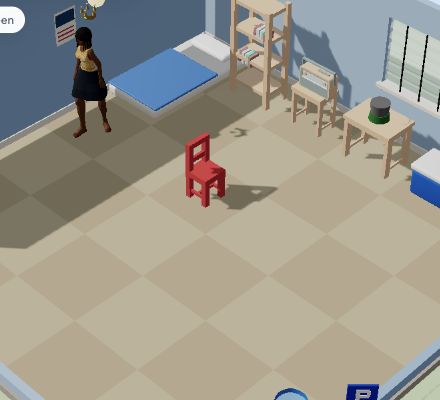
Home room checked October 11, 2026. The capture excludes account and wallet controls.
Resume a saved session and use a smaller screen
Reloading the signed-in browser showed a saved-character screen with Continue and a separate new-life option. Choosing Continue returned to the Home room, and the observed Energy value remained 73%. This confirms the resume flow in the same signed-in browser; it does not establish cross-device synchronization or every possible save condition. Use Continue when resuming that session rather than selecting the new-life option.
At a 390-pixel viewport, the navigation and needs panel remained usable and the page had no horizontal document overflow. This was a desktop browser at phone width, not a separate iOS or Android device test. If a control is covered by a panel, close the panel before assuming the game has ignored the action.
Lagos Life on a phone: browser access and apps
The official homepage currently describes free browser play. To use that route on a phone, open lagoslife.app in your browser and use the host’s own account screen. Start with the browser route before searching a store for a similarly named app: a name match alone does not establish that a listing belongs to this operator.
Our October 11 check did not locate a Google Play or Apple App Store link on the official homepage. An Android or iOS store edition and shared progress between an app and the website are therefore not confirmed here. The 390-pixel check below the resume instructions describes the web layout; it does not establish native-app availability or performance on a physical phone. For a store edition, follow a publisher link from the official website and check its developer identity before installing.
Game Naira and the city setting
Lagos Life says it draws on Nigerian life, but its events, places and systems can be fictionalized or changed for gameplay. Its in-game ₦ amounts are Game Naira: the disclaimer says they are not Nigerian legal tender and cannot be withdrawn into a bank account.
Account and browser basics
The current terms require users to protect their account and prohibit selling or sharing it without the operator’s written permission. They also prohibit exploits or interference with the game or its servers. Keep the game tab active while testing it. If a control is unresponsive, click back into the page and check its on-screen prompt before changing browser settings.
If the page looks incomplete
For account-entry problems, start with the Lagos Life login troubleshooting table. For a game interface that opens but displays incorrectly, check the connection and visible error before changing browser settings. The browser-games troubleshooting guide provides a separate loading and display checklist.
Lagos Life game FAQ
Where is the official Lagos Life login?
Use lagoslife.app and choose Log in on its homepage. If your signed-in session is already recognized and a saved character appears, choose Continue. The official entry button at the top of this guide links to that homepage, not to a login form hosted here.
Why do I see Continue instead of Log in?
The homepage can recognize an existing signed-in session and show its saved character. Continue returns to that character; New life is a separate option. The October 11 same-browser check returned to Home through Continue, with the observed Energy value retained after refresh.
Can I sign in with Google or Apple?
The operator’s privacy policy, checked October 13, says social login is not currently provided. Use the account flow shown on the official website instead.
What if I forgot my Lagos Life password?
Use the current official form’s recovery option if one is offered. Otherwise, open Our official accounts and emails on the homepage for the operator’s current contact details. This guide cannot reset a password and does not provide an unverified reset URL.
Is Lagos Life free?
The official homepage describes free browser play, and the registration screen labels sign-up free. The checked session also offered free Trek travel and a free Take a Nap action. Other transport choices displayed in-game prices, so free access does not mean every action or item has no cost. Check the current action label before confirming it.
Do I need a Lagos Life account?
A personal game session uses an account. The homepage has a public city preview, but that preview is separate from a signed-in character. Use Log in for an existing account and Continue when the saved-character screen appears. The registration screen checked for this guide requires adult eligibility.
Can Game Naira be exchanged for real money?
The official disclaimer identifies the displayed amounts as fictional Game Naira, not Nigerian legal tender, and says they cannot be withdrawn into a bank account. Treat them as part of the game’s economy when comparing action prices.
Does Lagos Life work on a phone?
The web interface remained usable at a 390-pixel desktop-browser viewport, including navigation and the needs panel. This is a layout check rather than a physical Android or iPhone test. Use the official browser route and check the host’s compatibility message if the game cannot start. Cross-device progress and native-app access are not established by the same-browser Continue test.
Sources
Check the sources below for current product details, requirements and terms.