
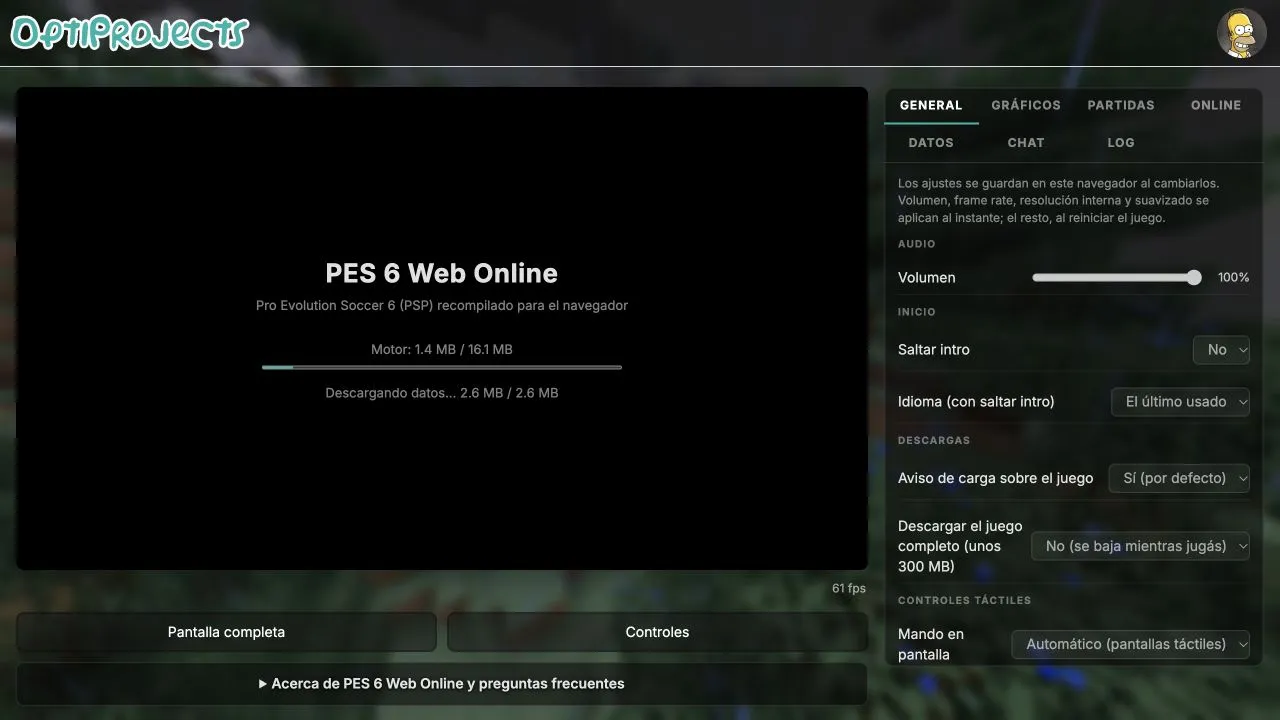
PES 6 Web Online is an independently hosted browser project that describes itself as a PSP version of Pro Evolution Soccer 6 recompiled to WebAssembly. The site says a modern browser with WebGL2 is needed and lists keyboard, USB or Bluetooth controller, and touch input. It also says the project is unaffiliated with Konami. This guide records the entry and loading interface observed on October 14, 2026; it does not verify a played match, the project’s rights to original game data, or a measured frame-rate result.
Start from the host’s current entry screen
The checked screen offered three preloading choices: original Spanish commentary, Mariano Closs commentary, or no commentary. It displayed Preparando… and Descargando… during startup. A captured loading state reported an engine stage of 1.4 / 16.1 MB and a data stage of 2.6 MB; settings were disabled at that point. These details show an in-progress initialization, not a completed game launch.
Choose one current start option and leave the tab foregrounded while the page prepares resources. If the host displays a clear error or a retry control, retry once rather than repeatedly restarting the page. At the observed entry stage, no prompt to provide original game files appeared. That absence does not verify the provenance, licensing, or completeness of any data the host loads; this guide does not supply files, archives, or download workarounds.
Browser and input preparation
The host lists WebGL2 and current Chrome, Edge, or Firefox as compatible browser requirements. Before starting, make sure your chosen browser is current and that its normal hardware-acceleration settings are available. Do not disable browser protections or accept security warnings just to advance a load screen.
The visible save interface uses PSP-style prompts: arrow keys or a directional pad choose an item, Enter or Cross accepts, and Esc or Circle cancels. The host also says it supports controller and touch input. These are published mappings and capabilities, not verified in-game control tests. Click inside the game area before deciding that a key or controller input failed, because browser focus can remain outside the player.
The host documents settings for volume, match-frame-rate selection, internal resolution, renderer choice, and smoothing. It says some changes apply after a restart. Do not turn that into a performance recommendation: no match rendering, input latency, or FPS measurement was made for this guide. Record the initial value, change one setting, and return to the same loading or menu stage before making another adjustment.
Saves, option files, and online claims
The project says its saves and option files can be imported as a .zip or PSP SAVEDATA folder. Treat an import as a local-browser operation and keep a separate copy before overwriting anything. Test restoration in the same browser before relying on a backup across devices.
Its FAQ says online rooms use the game’s Wireless/Online area and a peer-to-peer connection. Availability, latency, room population, and successful matches were not checked here. The page’s guidance about 30 FPS on weaker hardware is a host recommendation, not a result reproduced for this guide.
If the page stays on its loading screen, try one controlled reload, then compare in a private window or another current browser. For a blank canvas or input problem, follow the focused steps in the browser-game troubleshooting guide.
Is this the original PC PES 6 release?
No. The host identifies this project as a PSP version recompiled for the browser.
Did this check confirm a playable match?
No. It reached loading and interface states only; no gameplay or FPS result is claimed.
Does the host prompt me for an original game file?
No such prompt was observed in the checked loading state. That does not establish the origin or licensing of the project data.
Sources
Check the sources below for current product details, requirements and terms.