
The entry point is The Simpsons: Hit & Run browser host. The ?skipmovie query is a startup option, not a promise that the game is free, fully downloaded, or ready immediately. This guide records the host’s observed loading path and the separate requirements described by the related WebAssembly project.
What was observed on the host
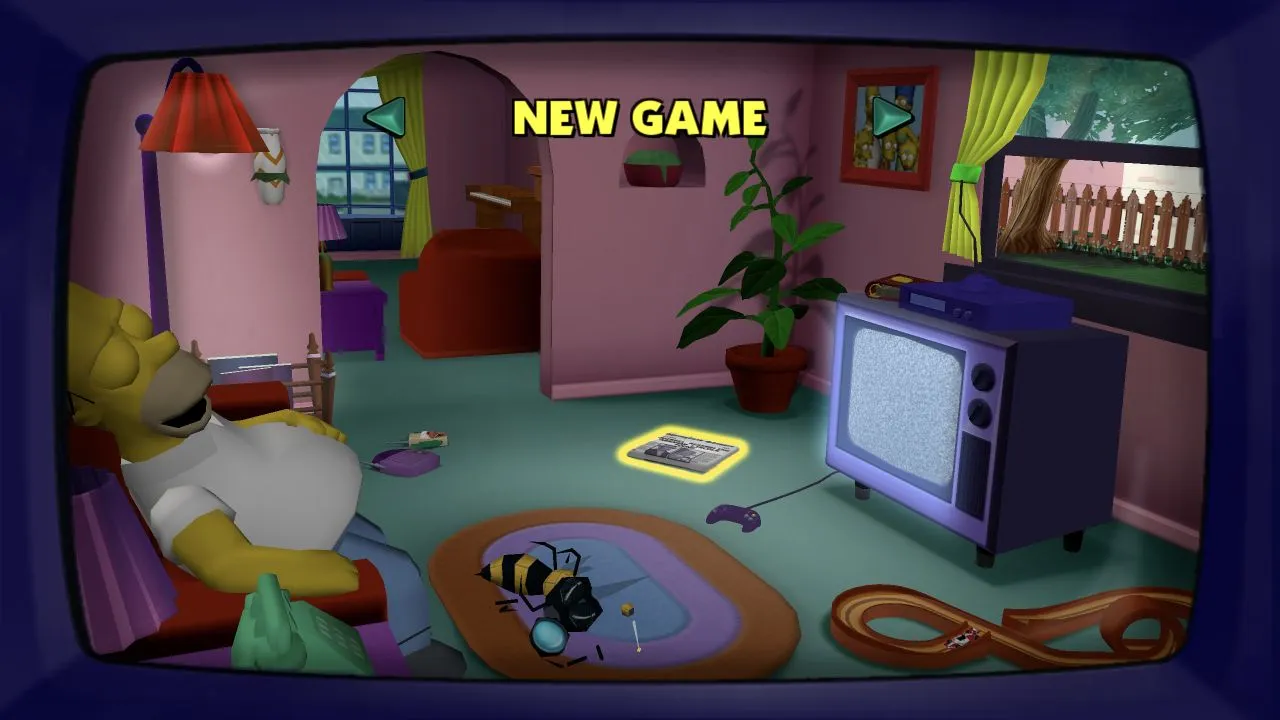
The page first showed a loading state with Play disabled. After loading completed, Play became available. Selecting Play displayed a 2003 copyright screen and the game logo, then changed to a black canvas while the browser continued loading. After waiting, the canvas reached an animated NEW GAME main menu showing the Simpsons living room with Homer on the left and a television on screen. The black canvas was therefore an intermediate loading stage. Character movement and an in-game run were not verified.
The host is an external project. It does not establish that a complete commercial release, game assets, mobile support, stable frame rate, or browser saves are included. No asset download links are provided here, and this guide does not host or distribute binary game files.
Why loading can take a while
The related iscle WebAssembly project README identifies a browser build of the SHAR engine. The repository contains the compiled engine only; it says that no game data is included. Its documented deployment expects a separate assets base URL pointing to game data that the user owns. The engine streams roughly 1.8 GB of assets on demand, uses WebGL with pthreads, and requires the asset host to support HTTP Range requests and permissive CORS headers. Without an available asset directory, the README says the page can remain at the loading screen.
That repository is supporting project documentation, not evidence that the Workers host is owned or operated by the repository author. The two URLs should be kept distinct when reporting a problem: the Workers page is the observed entry point, while the GitHub README explains the engine/assets split and the likely reason for a long or stalled load.
Suggested startup path
- Open the host in a current desktop browser and wait for its initial loading work to finish.
- When Play becomes enabled, select it once and leave the tab focused while the copyright screen, logo, and canvas load.
- Allow extra time after the black canvas appears; it may transition to the animated NEW GAME menu.
- If the page does not progress, record the browser, approximate wait time, and the exact visible state before reporting the issue to the host.
The related README documents retail-style controls such as WASD movement/driving, Space to jump, Shift to sprint, left click for action or entering/exiting a car, right click to attack, and numpad camera controls. These are project documentation, not controls independently confirmed on the Workers host. Do not infer mobile controls, FPS, save behavior, or complete campaign access from them.
For general browser checks such as tab focus and hardware acceleration, see browser game troubleshooting.
Sources
Check the sources below for current product details, requirements and terms.