
WASM Arcade is the name of the independently operated platform at wasmarcade.com. It groups PC projects, arcade titles and Flash games into one browser directory. This guide explains its entry routes and the startup stages observed on October 13, 2026. Radiant Optimizer Guide is independent of that platform.
Open the WASM Arcade platform ↗
Choose a WASM Arcade category
The checked homepage provided five system links. Choose a category first when you want to compare similar games; use the site’s search when you already know a title. The displayed catalogue count changes as entries are added, so it is not a compatibility guarantee.
| Category | What the directory groups here | Starting point |
|---|---|---|
| PC games | Projects including Minecraft, GTA-labelled entries and Hit & Run | PC directory |
| Neo Geo | Fighting, run-and-gun and sports entries | Neo Geo directory |
| Capcom arcade | Capcom arcade-system entries | Capcom directory |
| Arcade classics | Entries from other arcade systems | Arcade directory |
| Flash games | Flash titles presented through Ruffle | Flash directory |
These are the host’s categories. A cover image, catalogue listing or Ready label establishes an entry point; reaching an interactive game is a later stage.
Three checked entry routes
The October 13 checks used the Codex in-app desktop browser on macOS. Each detail page exposed a start control without an account form. The observations below cover that environment and visit, rather than all browsers or later host updates.
| Entry | Before starting | After the start control | Observation scope |
|---|---|---|---|
| Minecraft | Ready, EaglercraftX · WebAssembly, Play Minecraft | Loading, a dark embedded panel and Exit game | Startup panel observed |
| Metal Slug | Ready, Neo Geo · FinalBurn Neo, Play | Loading Metal Slug, Restart available | Loading; later Download Game Data 96% |
| Canabalt | Ready, Flash · Ruffle, Play | Loading message, Restart available | Flash loading stage observed |
Metal Slug later displayed Download Game Data 96% alongside a still-loading notice. The checks ended at these loading stages. They do not establish a completed game start or a cause for the delay. A different browser, connection or later visit may produce a different result.
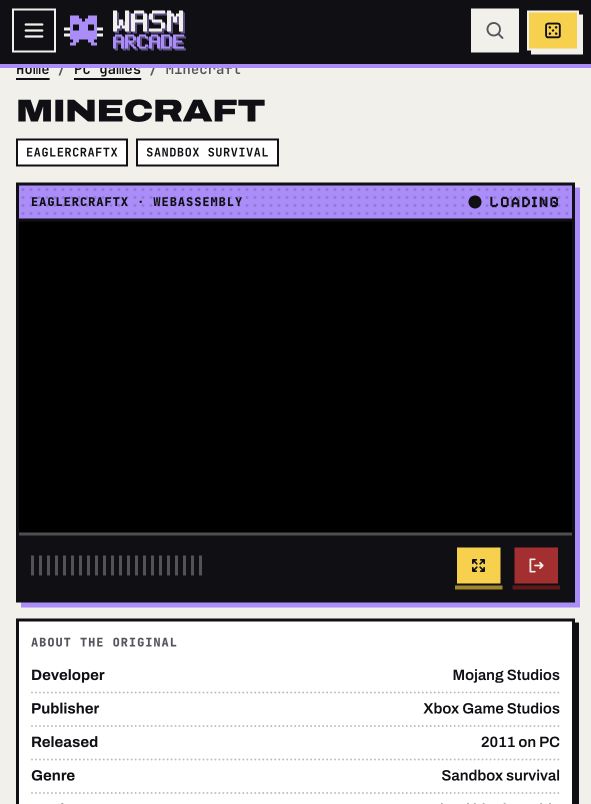
Minecraft startup panel observed on October 13, 2026. The Loading label is not an in-game completion claim.
Sponsor tabs and the actual game button
During the homepage check, clicking the Minecraft card opened a separate advertising redirect tab while the directory remained open. That tab was closed, and the Minecraft detail address was opened directly. The host’s privacy policy also describes sponsor tabs on browsing pages and at game starts.
If a new tab contains an advertisement, return to the game page and check its address. A registration offer or download promotion in a sponsor tab is separate from the game control. On the checked detail pages, the controls were Play Minecraft or Play inside the framed game panel. An advertisement opening does not establish that the game itself has started.
WebAssembly, emulators and Flash
WebAssembly is a browser execution technology; WASM Arcade is a platform name. The host labels different routes with different engines: EaglercraftX for its Minecraft entry, FinalBurn Neo for Metal Slug, and Ruffle for Canabalt. A shared platform does not make their controls, loading process or save behaviour identical.
Ruffle describes itself as a Flash emulator. A Flash title running through it is a different route from a PC-game port. Check the particular project’s instructions before assuming multiplayer, touch input or gamepad support.
The Minecraft host describes its entry as a community Minecraft 1.8.8 project. That is separate from Minecraft Classic, which has its own browser version, controls and limitations. Similarly, a GTA-labelled card alone does not verify feature parity with a retail desktop release.
If you are specifically looking for GTA V, read the separate GTA 5 Web status check. It distinguishes the PlayGTA5 address, an archived loading page and the Vice City project; this platform guide does not confirm a playable GTA V entry.
Loading, controls and saved progress
When a page remains at Loading, first distinguish the host shell from the embedded player. A visible title and visible Restart control show that the surrounding page responded; they do not prove that the game assets finished loading. Allow the current attempt to complete before starting another one, then compare one current browser if the state persists. Our browser-game troubleshooting guide explains focus, graphics and saved-data checks.
Metal Slug’s detail page listed arrow keys for movement, V for inserting a coin, Enter for start or pause, and X/S/Z/A for its four buttons. Those are displayed instructions, rather than a verified control test. Read each entry’s controls instead of carrying Minecraft’s keyboard layout into an arcade emulator.
The platform’s privacy policy says saves remain in browser storage and describes export and import controls. Treat this as the operator’s storage policy, not proof of a successful save round-trip for every game. Before clearing site data or changing browsers, look for an export option and keep a backup of progress you want to preserve.
Phone and desktop expectations
Start with the input requirements of the specific entry. A layout fitting a narrow screen does not establish touch movement, aiming or comfortable play. Keyboard and mouse instructions on a host page are useful when choosing a desktop route, but they cannot substitute for testing that route on your own device.
For other independently hosted projects, compare our classic browser games collection or return to the game directory. Those guides describe their own hosts; this platform guide does not add the entire WASM Arcade catalogue to our curated game count.
Frequently asked questions
Is WASM Arcade an official publisher site? Its footer identifies it as an unofficial archive and states that it is not affiliated with the listed rights holders. Use the platform’s own project and copyright pages to understand its position.
Does every game work immediately? The three checked routes reached Loading. Availability and successful startup need to be checked per entry and browser.
Do I need an account? The three checked detail-page routes exposed their start controls without an account form. The operator’s privacy policy also says it has no accounts.
Can I keep a save across devices? The operator describes local browser saves and export/import. Check the relevant game’s save tools and verify your backup before relying on a transfer.
Sources
Check the sources below for current product details, requirements and terms.