
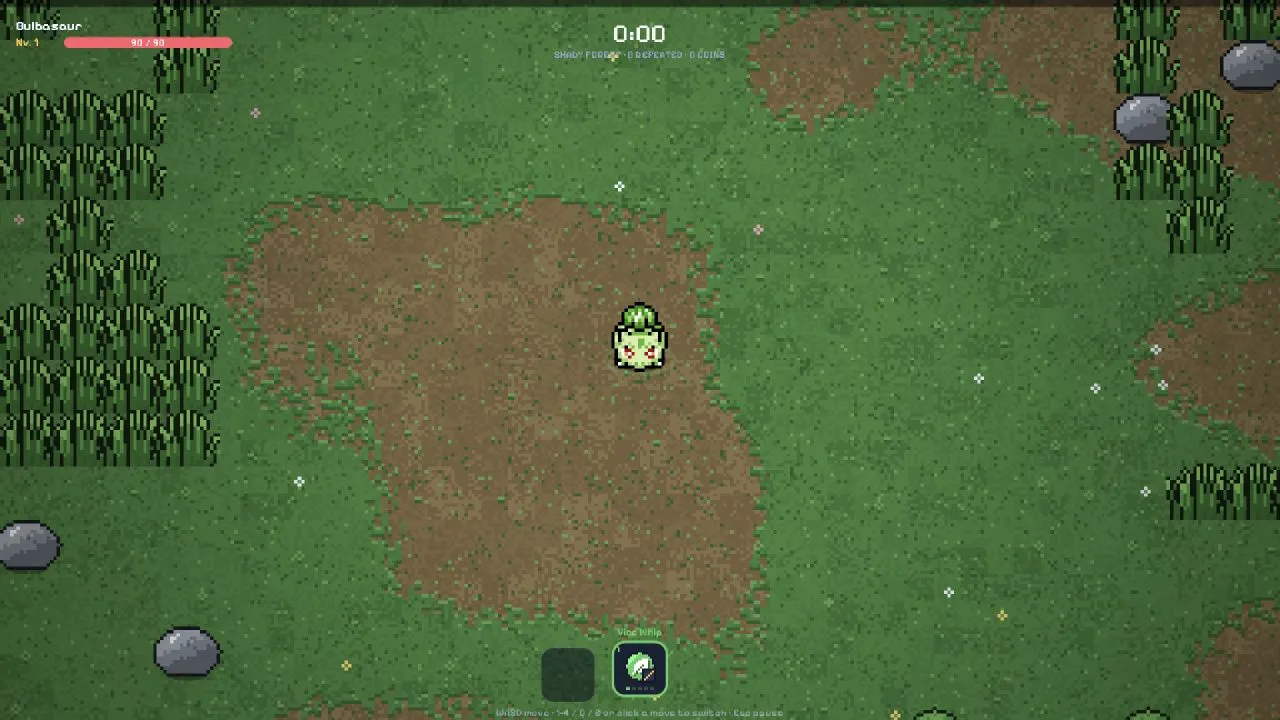
PokéSurvivor, also searched as Poke Survivor, is a Pokémon fan game built around short survival runs. This guide follows a checked browser guest session, from the opening questions to a level-up choice and a run result. Start with the saving decision: the live entry screen warns that guest progress is not saved.
Where to play Poke Survivor and what to check first
Open PokéSurvivor on the developer’s site ↗. The developer’s itch.io release points to this online host. You can try the browser game without downloading its offline package.
| Before you start | What to expect | Evidence |
|---|---|---|
| Try the game as a guest | Follow the eight-question opening route. The menu warns that progress is not saved; refreshing restarted guest entry in our check. | Desktop guest session, October 12 |
| Keep a collection or continue on another device | The developer describes account-based cloud saves. Confirm the current account and saving instructions before investing in a long session. | Developer documentation; account recovery was not tested |
| Learn the controls | Move to avoid enemies; the developer says the active move attacks automatically. See the controls and level-up observations below. | Developer guide plus the checked opening run |
The instructions below document the online guest route. They do not establish how the optional offline package, an account save, or a multiplayer session behaves.
How to start Poke Survivor as a guest
The October 12, 2026 desktop browser check followed this route:
- Open the developer’s host. A loading message appeared before Press to start.
- Select that prompt. The next screen offers name/password login, Google sign-in and Play as guest.
- Select Play as guest for a trial. This led to Question 1 of 8, rather than directly into combat.
- Answer all eight questions. The checked answers produced Bulbasaur, alongside Let’s go together! and Choose another. A different answer set may produce a different result; this is not a recommendation for an optimal partner.
- Confirm the partner. The main menu includes Play — Enter the dungeon, Pokémon, Upgrades, Missions, Friends and Settings.
- Select Play to enter the forest run. The opening HUD showed Bulbasaur at level 1 with 90/90 health and Vine Whip.
The menu also showed Guest mode: not saved. Treat this as a trial route before investing in upgrades or a collection. The menu’s Pokémon counter was 1/966; it did not mean the guest had unlocked every partner.
Controls and the first level-up choice
| Control | What it does | What was checked |
|---|---|---|
| Arrow keys | Move the partner during the run | Used in the desktop opening run |
| Esc, then Continue | Pause and return to the battlefield | Both transitions were checked |
| WASD | Movement | Shown in the pause panel; the recorded run used arrow keys |
| 1–4 | Move controls shown in the pause panel | Only a reward-card selection with 1 was tested; in-combat move switching was not checked |
| Q/E | Cycle moves, according to the developer’s guide | The pause panel showed the cycle reminder; cycling was not tested |
Read the pause panel before resuming. The developer distinguishes choosing the active move from firing it: attacks happen automatically, while you control movement and positioning. Keep that distinction in mind when learning the move bar; this run did not test every move control.
The checked run reached Level 2. Its three reward cards were Grass Knot, Synthesis and Toxic Spikes. The card descriptions distinguished a new Grass move, a health-regeneration upgrade and a new Poison move. Pressing 1 selected Grass Knot; the later result listed both Vine Whip and Grass Knot at level 1. These are the choices observed in this run, not a universal reward order or a best-build ranking.
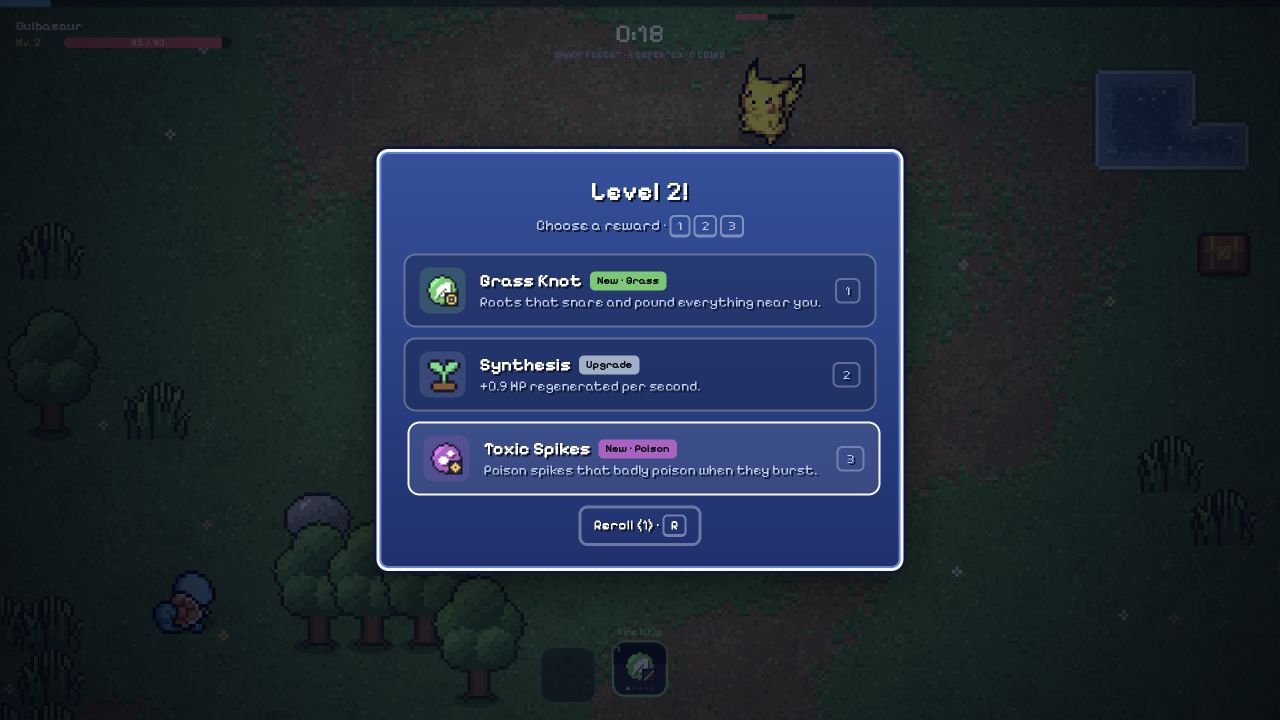
Level-up screen captured October 12, 2026. Reward availability can vary between runs.
What the opening run recorded
The first run ended with You fell…. The result showed 0:23, Level 2, 3 defeated, 0 bosses and +4 Pokécoins. Returning to the menu displayed one run, a best time of 0:23 and a balance changing from 600 to 604. These numbers document the opening check; they are not a target score, a performance benchmark or a complete progression guide.
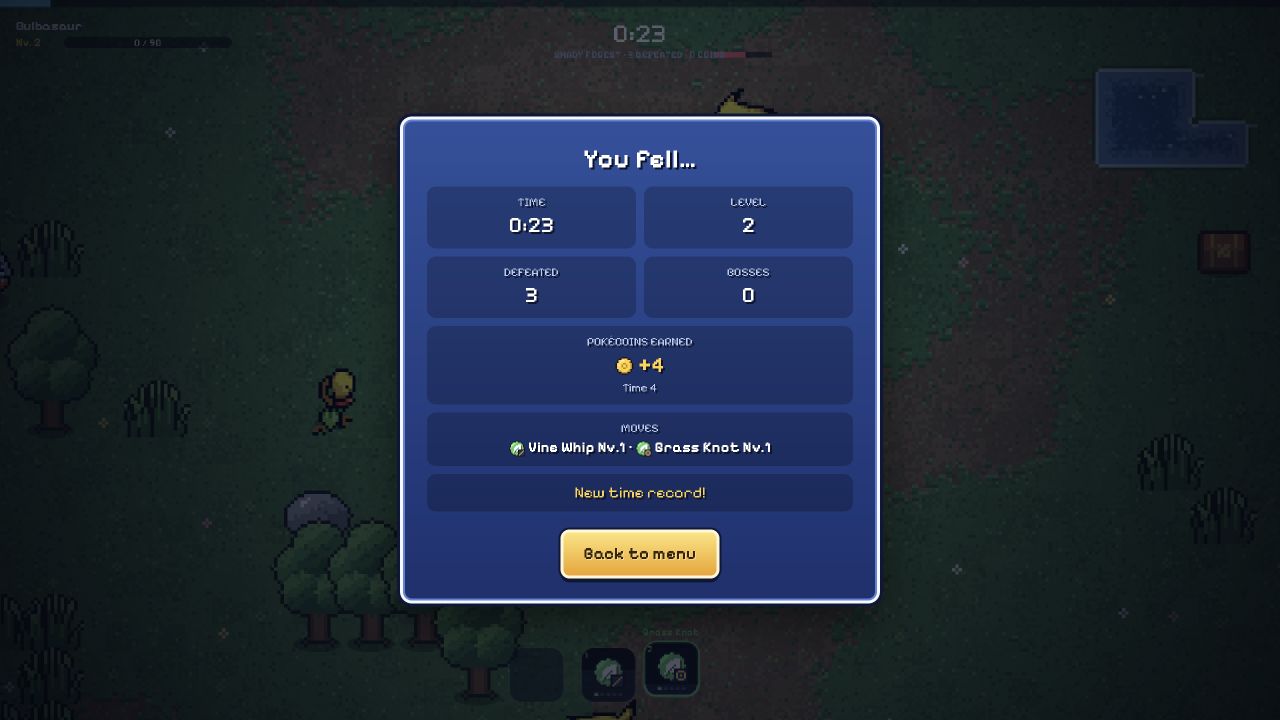
First guest run result, October 12, 2026. The listed time is survival time, not loading time.
For a first attempt, learn how to move, pause and identify a reward before chasing a long run. Read whether a reward adds a move or changes an existing attribute. A new button on the move bar and an upgrade card serve different purposes; neither this short check nor the card screenshot establishes which choice is strongest.
Does PokéSurvivor save guest progress?
In the checked browser, refreshing during a second guest run returned to Press to start, then the login/guest screen. Selecting guest again opened Question 1 of 8. It did not resume the previous forest scene or show the previous menu record through that route.
The developer’s guide describes online account saves as cloud-based and guest play as unsaved. Account creation and cross-device recovery are separate from this guest observation. Before a long session, follow the host’s account instructions and confirm its current saving notice. Our directory’s Save game button only bookmarks this guide; it does not store Pokémon, coins or an active run.
For another game with a checked same-browser reload, see A Dark Room. Saving behavior belongs to each host and should not be assumed to work the same way across the game directory.
Browser version, offline download and mobile
The developer’s itch.io release recommends the online host. It describes the optional offline package as solo play with browser storage, while the online service supplies cloud saves, co-op and leaderboards. Keep those versions separate when comparing saving instructions. No download was needed for the guest route documented here; use the developer’s release page if you specifically want its offline package.
For phones, the developer guide recommends landscape orientation and describes dragging to move, tapping moves and using the pause control. It also advertises online co-op for up to four players. These are developer-documented options, rather than conclusions from the desktop guest run. No multiplayer invitation or physical-phone test was part of the recorded session.
If the game stays on a loading or blank screen
Distinguish the loading message, start prompt, login screen, quiz and battlefield. Each is a different stage; reaching the host alone does not establish that combat loaded. A battlefield drawn as graphics may expose little text to accessibility tools, as this checked scene did.
Wait for the visible next prompt before clicking repeatedly. If a stage remains stuck, note the browser and the last visible message, then compare a fresh regular browser tab. Read the host’s guest-save warning before refreshing an active run. Use our browser game troubleshooting guide for further checks.
PokéSurvivor FAQ
Is Poke Survivor available in Spanish?
The developer documents English and Spanish, with the initial language following the browser and a language option in Settings. For Spanish instructions, use the developer’s Guía de PokéSurvivor. Changing language was not part of our desktop guest check.
Is this an official Pokémon game?
No. The developer identifies it as a non-profit fan project independent of Nintendo, GAME FREAK and The Pokémon Company. Game screenshots here illustrate the checked guide; character rights remain with their owners.
Is it free, and do I need original Pokémon files?
The developer describes the game as free with voluntary support. The checked guest session used the web host without an original game file, payment or account.
Can I skip the quiz or choose a different partner?
The observed guest route presented eight questions. The result offered Choose another, but the check confirmed Bulbasaur with Let’s go together!. Follow the current menu for alternate choices; a one-run record is not a complete partner-unlock guide.
Where should I look up Pokémon and moves?
Use the developer’s Pokédex and move reference. This page concentrates on getting started and understanding saving, rather than duplicating those catalogs.
For a turn-based daily battle, see Daily Red: versions, rules and saved progress. It is a separate fan project with a different daily-attempt and saving model; this survival-run guide does not supply its rules. For another short browser survival run, see Azeroth Survivors: browser requirements, controls and first run; its checked route has a separate WebGPU requirement and no verified save conclusion.
Sources
Check the sources below for current product details, requirements and terms.