
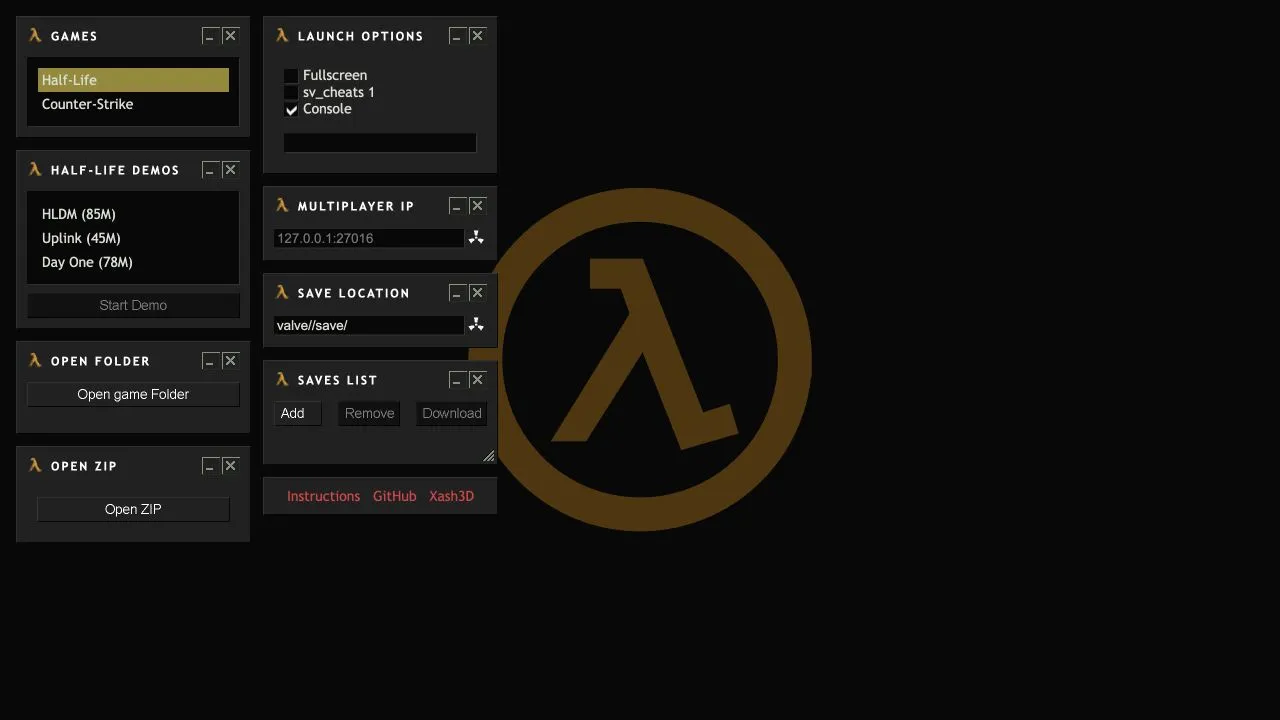
x8bitrain.github.io/webXash/ is the primary launcher route for this guide. Its visible launcher offers Half-Life and Counter-Strike choices, including demos such as HLDM85M, Uplink45M, and DayOne78M, with Open Folder and Open ZIP actions. The launcher can also expose save and control settings. This entry state is a launcher, not proof that a complete campaign has loaded.
Source-checked controls
The public webXash repository documents local valve and cstrike game roots, a read-only memory filesystem, IndexedDB save persistence with export, -game mod selection, and direct WebSocket multiplayer by IP rather than Steam discovery. These details explain why the launcher asks for local content and why saves can persist in the browser. A simpler Pixelsuft port remains an alternative Xash3D Emscripten shell with memory-size, console-log, resize, pointer-lock, and fullscreen controls.
For full Half-Life or Counter-Strike, the README explicitly requires your own installed game files. Select their root folder containing valve and, for Counter-Strike, cstrike. The browser reads these files into memory; the project says it does not write to the selected original folder. The demo choices are separate routes and do not provide a full retail installation. No owned game folder was imported in this check.
First run
- Open WebXash.
- Give the page time to move past its download/loading state.
- Choose a demo only when its Start Demo control is enabled, or prepare your owned game root folder for Open Folder / Open ZIP.
- Use the launcher’s Open Folder or Open ZIP action for your permitted game files, then choose the available mod or demo. Use save export before clearing site data.
Keep the tab focused during startup. A blank canvas alone is not proof that the engine is dead; inspect the loading status or console-log option first.
Troubleshooting
Use a current desktop browser with a keyboard and mouse. For a failed file import, check that your selected root contains valve / cstrike, rather than selecting a child folder missing the root structure. The project uses a direct WebSocket server address for multiplayer; it does not provide normal Steam internet server discovery. A visible Multiplayer IP box is not proof of a live compatible server.
Counter-Strike 1.6 in WebXash
Choose Counter-Strike and supply your own cstrike content alongside the required base files. The README says its save manager is disabled for Counter-Strike, so Half-Life save instructions do not apply to it. For Half-Life, the project documents IndexedDB saves and a Download export button. Export important saves before clearing browser data; the directory’s Save game button bookmarks this guide and does not back up game progress.
Pixelsuft alternative
The separate Pixelsuft entry exposed a Memory size value of 150 and Start. Those are that launcher’s controls, not WebXash options. Its runtime also exposes loading and console controls. Check its own instructions before switching; files, settings and saved progress are not automatically shared between these sites.
FAQ
Can I launch Counter-Strike 1.6 here? The launcher supports a cstrike game root; you must provide permitted Counter-Strike files yourself.
Is this a complete campaign? Not verified from the inspected entry state.
Does it require an account? No account control is visible.
Related: QuakeWorld, Return to Castle Wolfenstein, browser troubleshooting.
Sources
Check the sources below for current product details, requirements and terms.