
The canonical browser entry is mitchellhynes.com/halo/halo.html. The page opens a WebAssembly client with an overlay and a COOP/COEP message. It exposes Focus game, Unmute, Fullscreen, and a PLAY ONLINE control. This guide covers the launcher and controls; it does not claim that the full campaign is included or that an online session is available at every visit.
Visible controls and mapping
The page’s documented mapping is:
- WASD: movement; mouse: look/aim
- Space: A button; F: B button; E/R: X button; Tab or mouse wheel: Y button
- Q: white controller button; X: black controller button; G or right mouse button: grenade; left mouse button: fire
- C: left-stick click; Z or middle mouse button: right-stick click; Esc: start/menu behavior
Use Focus game before testing keyboard input. Unmute is separate from focus and may be required after browser autoplay restrictions. Fullscreen changes the canvas presentation only. PLAY ONLINE is a visible entry control; it is not a promise that a server or match is currently available.
Browser requirements
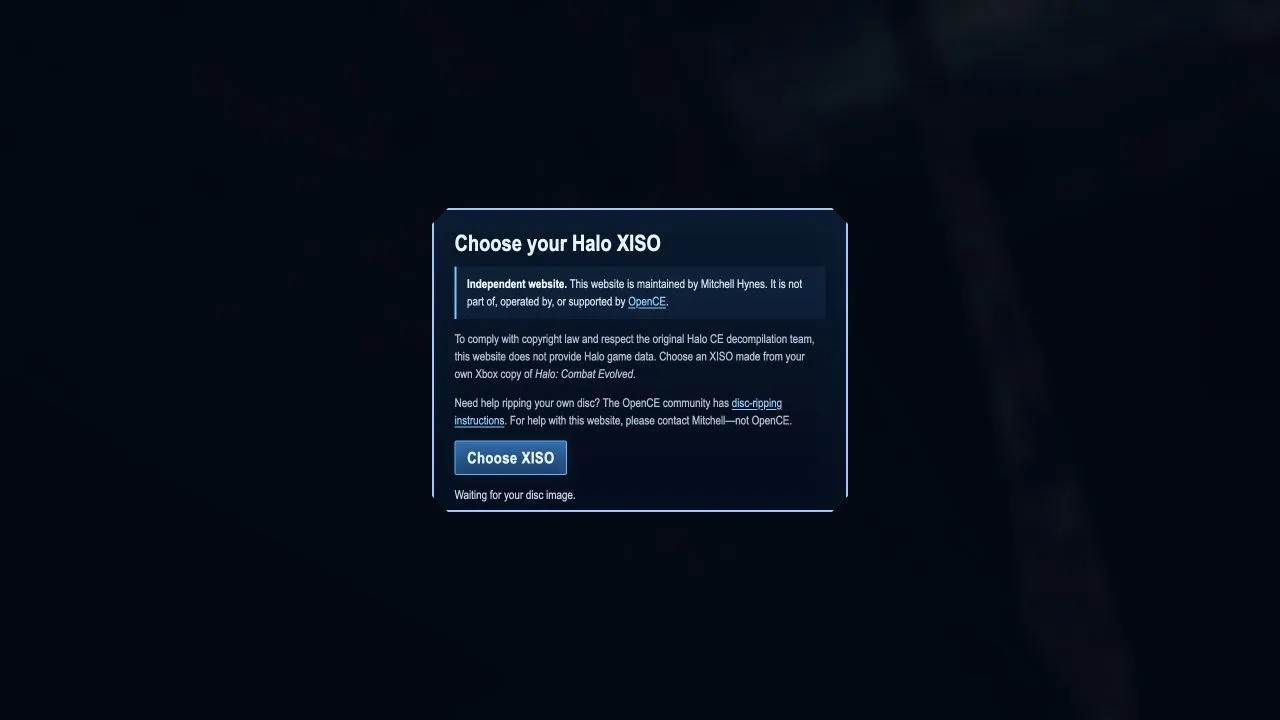
The page shows a WebAssembly download/loading overlay and a COOP/COEP message, then reaches a dialog asking you to choose your Halo XISO. The site does not provide the game files: prepare an XISO from your own Xbox copy before expecting the client to continue. Do not infer the desktop requirement from the mobile Halo page, which is a separate host with separate conditions. If loading stalls, retry in a modern desktop browser with JavaScript, WebAssembly, canvas, storage, and the site’s cross-origin isolation headers available.
First run
- Open the Halo CE page.
- Wait for the WebAssembly overlay to finish.
- At Choose your Halo XISO, provide a disc image made from your own Xbox copy. The page waited here during this check; no file was supplied.
- Follow the current host’s load messages after import. Focus game and Unmute are separate controls once the canvas is ready.
- Choose PLAY ONLINE only for the online route; its later account and connection requirements were not checked.
If keyboard input is ignored, focus the game canvas rather than the address bar or an overlay button. If the mouse is captured, use Esc according to the page’s mapping or the browser’s normal pointer-release gesture.
FAQ
Is the full Halo campaign confirmed? No. The inspected evidence confirms a WebAssembly browser shell and online control, not full campaign coverage.
Do I need an account? The launcher’s visible requirement is your own Halo XISO; a later online flow may differ.
What does COOP/COEP mean here? It is a browser cross-origin-isolation requirement surfaced by the loading page; treat it as a deployment/runtime diagnostic.
Related: Half-Life, QuakeWorld, browser troubleshooting.
For reproducible reports, record whether the WebAssembly overlay completed, whether the COOP/COEP notice remained, and whether Focus game changed keyboard behavior. This separates an initialization or hosting problem from an input mapping problem and avoids treating a silent or unfocused canvas as a gameplay defect.
For the separately operated PWA with ISO / XISO import and documented online-account features, read the Halo CE Mobile guide. It has its own storage and login requirements.
Sources
Check the sources below for current product details, requirements and terms.